Google Ads Account Takeovers: Real Attacks and How to Protect Your Business
Google Ads accounts have become high-value cybersecurity targets.
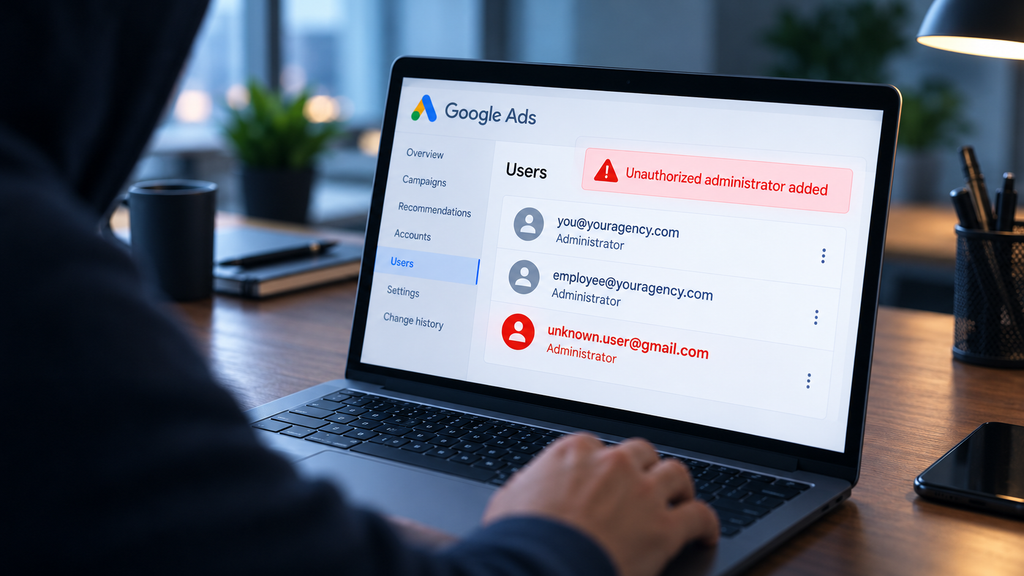
Imagine opening your Google Ads account one morning to discover that you can no longer control it. Someone else has administrator access, your campaigns have been changed, and your advertising budget is being spent on scams.
This isn’t hypothetical. Real Google Ads agencies have experienced takeovers affecting hundreds of client accounts, with advertisers facing fraudulent charges, interrupted campaigns, and sometimes lengthy recovery efforts.
And you don’t have to be the person who falls for an attack. A security failure at your Google Ads agency can put your account at risk, too.
Recent incidents show why protecting Google Ads requires more than passwords and conventional two-factor authentication.
A few stats:
- Overall internet crime is at an all-time high. The FBI reported $20.9 billion in internet crime related losses in 2025, up 26% from 2024.
- Within that space, Mimecast detected 6.4 million events over 4 years associated with attacks targeting Google Ads and Meta advertising accounts.
- Google itself suspended 24.9 million advertising accounts in 2025 for policy violations, with 4 million of those associated with scams.
These figures measure different aspects of cybercrime and advertising-platform abuse, not confirmed Google Ads account takeovers. But together with the documented breaches below, they show why advertisers need to take account security seriously.
Why is your Google Ads account such an attractive target?
Attackers aren’t necessarily targeting your website, bank account, customer database or other business assets. They want access to the Google Ads account itself.
This is because controlling your Google Ads account lets them spend your ad money to promote any of a range of scams anywhere in the world for as long as they can get away with it. For them, it’s free money to bankroll their criminal ventures.
Attackers also value the history and reputation of established Google Ads accounts. An account with a record of legitimate advertising activity can be more valuable than a newly created account, making it attractive for resale or use in further fraudulent campaigns.
In other words, your account is valuable to criminals not just because of its advertising budget, but because of the access and credibility it already possesses.
For you, a Google Ads account takeover can mean fraudulent charges, suspended campaigns, lost leads and revenue, and days or weeks spent fighting to regain control.
Even if fraudulent advertising charges are eventually reversed, the lost leads and sales opportunities from interrupted campaigns may never be recovered.
How do attackers take over your Google Ads account?
One of the most common attack methods is “credential phishing” (see the examples below). In this attack a user is tricked into giving up information that allows an attacker to authenticate (log in) to Google pretending to be the user. Once inside, an attacker may add unauthorized users, remove legitimate administrators, and begin spending the advertiser’s budget on fraudulent campaigns.
Credential phishing is particularly dangerous because it works at scale and can defeat conventional password + two-factor authentication (2FA).
AI has made these attacks even more convincing and easier to carry out. Criminals can now generate professional, personalized phishing messages in large numbers, without the awkward wording, spelling mistakes, or other telltale signs that once made fraudulent messages easier to recognize. Even careful employees can be fooled by a convincing fake message.
Below, we’ll explain why conventional 2FA may not stop these attacks.
Importantly, your account can be taken over even if you are not targeted. It could be one of your employees or team members who becomes the victim of a phishing attack. Or it could be your agency. Agencies are especially attractive targets because compromising a Google Ads manager account can expose many client accounts simultaneously, potentially giving an attacker access to millions of dollars in advertising budgets.
Your Google Ads account is only as secure as the people and systems that have access to it.
That includes your employees, contractors, third-party tools, and especially your Google Ads agency. A security failure at any of these points can put your advertising budget and campaigns at risk.
4 real-world Google Ads attacks and what they teach us
Let’s get a sense of what’s actually happening out there.
Case 1: Fake Google Ads login pages advertised on Google itself
January 2025 | Malwarebytes
Source: Original Malwarebytes investigation
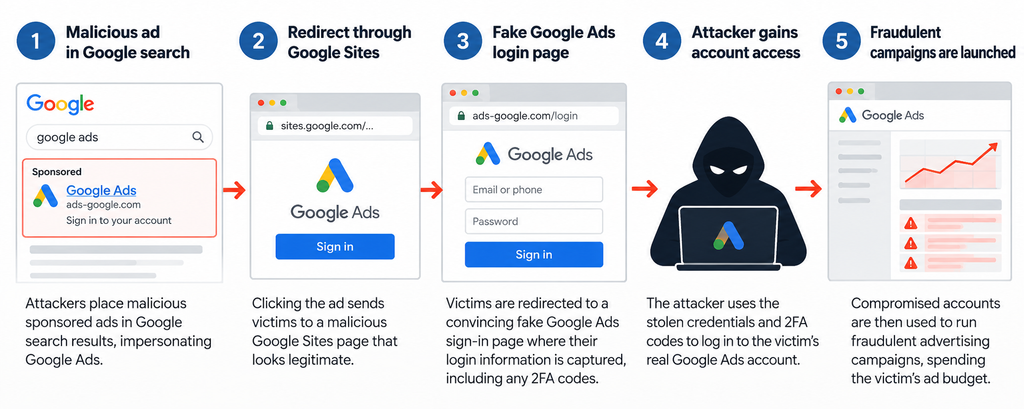
Illustration of the Google Ads phishing campaign documented by Malwarebytes in January 2025.
The attack: Malwarebytes documented malicious sponsored search results impersonating Google Ads. Visitors were redirected through Google Sites to convincing fake sign-in pages designed to capture their Google account credentials and other information useful to attackers. Compromised advertiser accounts were then used to run further fraudulent advertising.
The lesson: Familiar Google branding, even in Google’s own search results, is not proof that a login page is legitimate.
Case 2: A wave of Google Ads agency account hijackings
November 2025 | Search Engine Land
Source: Search Engine Land reporting
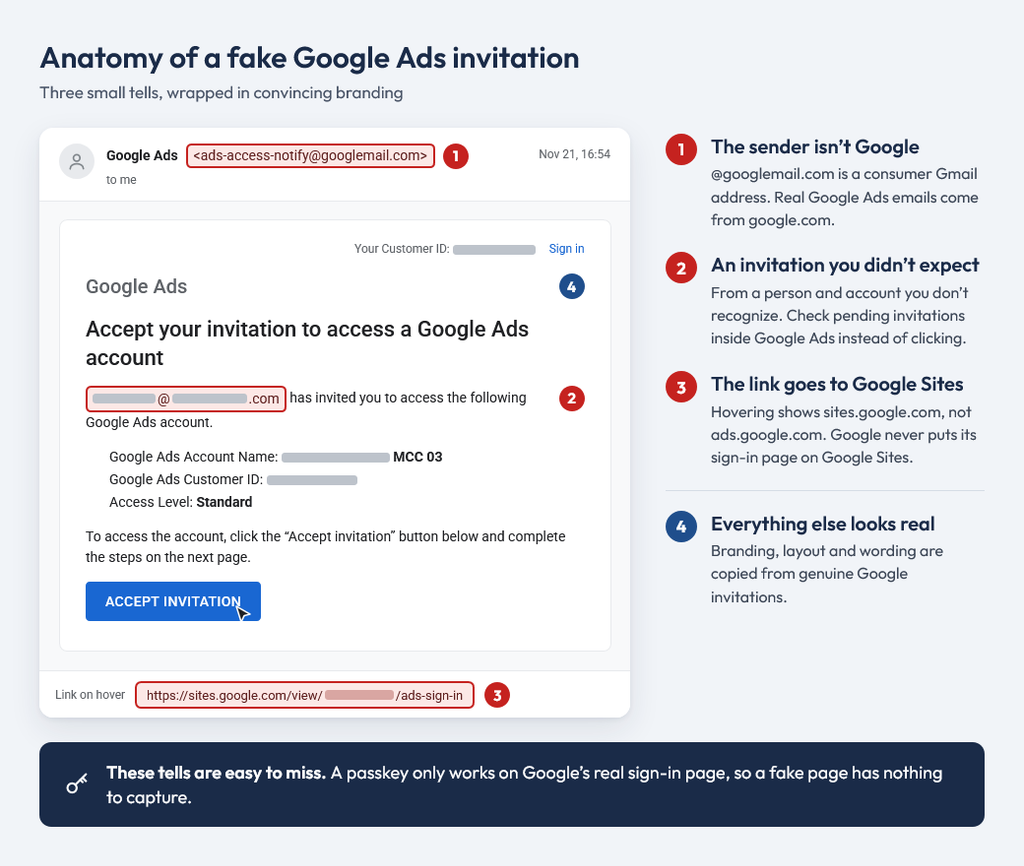
Illustration based on fake Google Ads invitations reported by Search Engine Land in November 2025. Identifying details redacted.
The attack: Multiple agencies have reported convincing fake account-access invitations, unauthorized administrator changes, and substantial fraudulent spending. One agency reported tens of thousands of dollars in unauthorized spend within 24 hours.
The lesson: An agency Google Ads manager account is an especially valuable target because compromising it can expose many advertisers simultaneously.
Case 3: 230 advertiser accounts affected in a single agency breach
December 2025 incident | January 2026 report
Source: Breach report and Google’s response
illustrative image
The attack: The agency reported that attackers gained control of 230 client advertising accounts, removed legitimate administrators, and restricted victims to view-only access. The agency also reported difficulties regaining control despite contacting Google.
The lesson: An advertiser may lose the ability to manage its own account, even though it remains responsible for the business consequences.
Case 4: An agency breached despite having two-factor authentication
January 2026 incident | April 2026 firsthand account
Source: Search Engine Land reporting
illustrative image
The attack: In a particularly revealing account, an agency reported that attackers had access to an employee account for months and had added their own authentication method. They later took over the manager account, removed legitimate users, and attempted fraudulent charges of $1 million. The agency spent over a week regaining access after the discovery.
The lesson: Having 2FA enabled does not establish that an account is secure. Unauthorized sessions or authentication methods can persist undetected, creating risk long before the visible takeover.
These incidents raise two questions every advertiser should ask: How well is our Google Ads account protected, and how well is the agency managing it protected?
Why passwords + 2FA aren’t good enough
You might wonder, “How is this possible? Doesn’t my 2FA prevent others from logging in as me?”
Unfortunately, no.
Conventional two-factor authentication (2FA) methods use SMS codes, authenticator-app codes, and ordinary approval prompts. These are generally not phishing-resistant. Confirming the 2FA request approves the login flow that was begun by entering your password. However, and this is the crucial part, you may not realize whose login you’re approving.
In these phishing attacks you are presented with a convincing but fake login screen. You enter your username and password, and then you receive your “usual” 2FA confirmation request. However, behind the scenes something different is taking place. The attacker immediately relays your username and password to their own valid Google login screen. When they submit their login form, that triggers the 2FA request that you receive. By completing the authentication request, you may unknowingly authorize a session controlled by the attacker. Your second factor is working, but it is used to approve the wrong login. They are now logged into your account.
Why passkeys are different
Passkeys use the FIDO2 authentication standard, which relies on public-key cryptography to provide phishing-resistant authentication. Passkeys can be stored on your phone, computer, password manager, or a dedicated hardware security key such as a YubiKey.
Unlike conventional authentication methods, passkeys protect against credential phishing in three significant ways:
- Passkey authentication is bound to the legitimate website. A passkey registered with Google can only authenticate with Google’s legitimate domain (google.com). If an attacker presents a fake Google login page on another domain, the browser will not allow that page to use your Google passkey.
- Passkey authentication responses cannot be reused. FIDO2 uses public-key cryptography to sign a fresh challenge for each authentication attempt. An attacker cannot capture the response and reuse it to authenticate in a separate login session.
- Passkey authentication does not transmit your private credential. Unlike passwords and one-time codes, the private cryptographic key remains securely stored in your device, password manager, or hardware security key. There is no reusable authentication secret for a phishing site to capture.
Why comprehensive security is still needed even with passkeys
Passkeys and hardware security keys resist the critical and prevalent attack of credential phishing. These methods prevent attackers from impersonating you through conventional credential-phishing attacks, which is a huge security improvement.
However, other attacks exist.
- An account that uses passkeys or hardware security keys is still only as secure as its weakest access option. If regular 2FA fallbacks still exist, or if other account recovery options exist, then those continue to be attackable access paths.
- Malware on a device or browser could allow attackers to steal an already authenticated browser session, allowing them to impersonate the user without repeating the normal sign-in process.
- Authorized third-party applications can create additional paths into your Google Ads account. If an integration or its access credentials are compromised, attackers may be able to act through the permissions already granted to that application.
- After gaining any type of access, an attacker may add another sign-in method or administrator, making recovery more difficult.
For these reasons, phishing-resistant authentication must be complemented with secure devices, up-to-date browsers, enforced user access controls, and active monitoring.
Google has elevated its own security
| February 2026: Multi-party approval | Google introduced a second-administrator approval process for certain sensitive changes, such as adding users or changing permissions. |
| April to August 2026: API sign-in | Google began requiring multi-factor authentication for the Google Ads API (Application Programming Interface) in April, then raised the requirement to passkeys in August. |
| July 2026: Passkey requirements | Google began requiring passkey verification for certain sensitive actions in Google Ads accounts. |
Google’s additional security checks apply to certain sensitive or unusual actions, but not every campaign or spending change. An attacker with a stolen authenticated session may still cause serious damage. That’s why phishing-resistant sign-in and active monitoring remain essential.
Google Ads platform safeguards do not replace an advertiser’s or agency’s responsibility for its users, connected accounts, devices, and ongoing monitoring.
How to protect your Google Ads account
Ask your internal team or Google Ads agency these 6 questions:
- Authentication: Do all users with access use phishing-resistant passkeys?
- Devices: Are devices accessing the account protected against malware and session theft?
- Permissions: Have unused users, former employees, and unnecessary agency connections been removed?
- Agency access: Who can access the agency’s manager account, and how is that access controlled?
- Monitoring: How are suspicious access changes, unexpected campaigns, and unusual spending monitored?
- Incident response: If your account is compromised, who is responsible for detecting the incident, contacting Google, stopping fraudulent spending, and restoring access?
And be sure that you always maintain appropriate administrative control of your own Google Ads account.
Conclusion: Google Ads security is part of responsible account management
The most important lesson from these incidents is not that Google Ads is inherently unsafe. It is that valuable advertising accounts attract sophisticated attackers, and responsibility for protecting them extends beyond Google’s own defenses.
If Google Ads is a critical source of leads and revenue for your business, the security practices of everyone with access to your account deserve serious scrutiny.
At Prometheus PPC, every team sign-in uses a passkey, with no weaker fallback methods for an attacker to target. Administrator rights sit in separate accounts that sign in only with a hardware security key. Access is granted by role and reviewed quarterly under a written policy built on the Center for Internet Security’s Controls, and we actively monitor for unexpected users, spending spikes, and other account changes. You’re welcome to review our policy.